Website accessibility, checked and fixed.

Find out where your site gets in the way of customers who use a keyboard, a screen reader or a magnifier. Start with a free automated check of any page. When you’re ready, we confirm what it found and fix it in your site’s code.

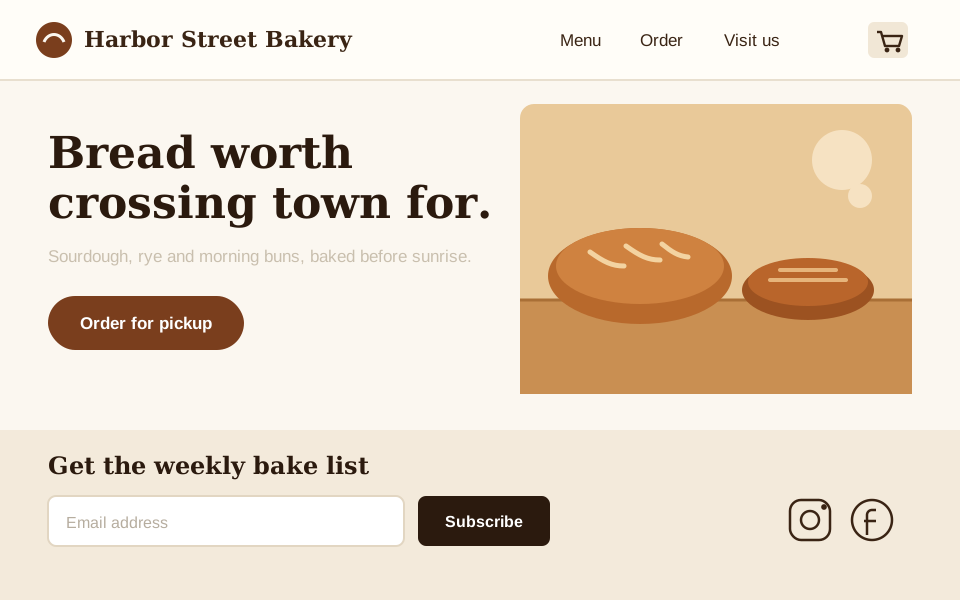
Homepage of Harbor Street Bakery, a fictional business used as an example.

Looks fine. An automated check flags five problems:

  1. Photo has no text description Critical

    Screen readers announce the file name, or nothing. The photo is the page’s main selling point.

  2. Tagline is too faint to read Serious

    Contrast is about 1.7:1. WCAG asks for 4.5:1 for text this size.

  3. Email field has no label Critical

    The gray “Email address” is placeholder text. It disappears when you type and isn’t a reliable label.

  4. Cart button has no name Critical

    It’s announced as “button.” Nothing says it opens the cart.

  5. Social links are icons only Serious

    Two links read as “link, link,” with no hint where they go.

Free. Checks one page. No email needed.Example: a fictional bakery’s homepage with the problems a check flags. Your results mark up a screenshot of your own page the same way.

Not everyone uses a mouse, or sees the screen

The page above looks fine to most visitors. Here it is for two groups of customers it quietly shuts out. They’re also the customers behind many website accessibility complaints. There’s nothing to choose here: the free check tests for both automatically.

Show the example page
Homepage of Harbor Street Bakery, a fictional business used as an example.

People who can’t use a mouse press Tab to move from link to link. On this page that’s nine stops, in the order shown.

  • You can’t see where you are. The site’s styles remove the focus outline, so after the first Tab press nothing on screen changes.
  • The main button is skipped. “Order for pickup” is a styled <div>, not a button. Tab never reaches it, so ordering needs a mouse.

Our free check tests whether focus is visible. Whether every control can be reached and used takes a person, in a full audit.

Blind and low-vision people hear the page read aloud by a screen reader. Here’s what it says, top to bottom:

  1. “Harbor Street Bakery, link”
  2. “Menu, link.” “Order, link.” “Visit us, link.”
  3. “Button.”No name. Which button?
  4. “Bread worth crossing town for, heading level 1”
  5. “IMG_2041.jpg, image”A file name instead of a description.
  6. “Order for pickup”Read as plain text. Nothing says it’s a button.
  7. “Edit text, blank”The placeholder isn’t announced as a label.
  8. “Subscribe, button”
  9. “Link.” “Link.”Icons with no names.

Check, verify, fix, re-test

Software is fast at finding patterns and bad at judging them. People are the opposite. Each step uses whichever is right for the job, and each one leaves you with something on paper.

  1. Check

    Done by: Software

    An automated check flags likely problems. The free check covers one page; an audit runs it across the pages we agree on.

    You get A list of potential issues per page

  2. Verify

    Done by: A person

    We test the pages with a keyboard and a screen reader, confirm which findings are real barriers, and look for what tools miss.

    You get An audit report with evidence, who is affected, the WCAG reference and a recommended fix for each issue

  3. Fix

    Done by: Us, or your developer

    We fix confirmed issues in your site’s code, theme or content. If you have a developer, we can hand them a plan instead.

    You get Corrected pages and a record of what changed

  4. Re-test

    Done by: A person

    We test the same pages again and note what passed and anything outside our reach, such as a third-party booking widget.

    You get A dated re-test report for the agreed scope

How audits and remediation work

Most sites have problems a quick check can find

Accessibility problems are usually small things repeated across a site: a missing label, a faint text color, an icon button with no name. For the person who runs into one, the outcome is the same. They can’t finish what they came to do, and they leave.

Some of them also complain, and some file suit. In 2025, plaintiffs filed 3,117 website accessibility lawsuits in U.S. federal courts under Title III of the ADA, 27% more than in 2024.1 That count leaves out state-court cases and demand letters settled before anyone files.

We aren’t a law firm, and we can’t tell you what the law requires of your business. What we can do is find barriers, fix them, and document what was tested and when.

Share of the top 1,000,000 home pages with each problemDetected automatically. WebAIM Million, 2026 report2
Any automatically detected WCAG failure
95.9%
Low-contrast text
83.9%
Images missing a text description
53.1%
Form fields missing labels
51.0%
  1. Seyfarth Shaw, “Federal Court Website Accessibility Lawsuit Filings Bounce Back in 2025,” ADA Title III blog, March 2026. Federal filings only. adatitleiii.com
  2. WebAIM, “The WebAIM Million: The 2026 report on the accessibility of the top 1,000,000 home pages.” Automated WAVE testing of home pages only. webaim.org

See what a full audit report looks like

The free check shows what software found. An audit adds what a person confirmed, how much it matters and exactly how to fix it. Our sample report uses a fictional site, but the format is the one you’d receive.

Open the sample report

Finding 3 of 11 Manually confirmed

Booking form errors aren’t announced

Where
/book, appointment form
What we observed
Submitting with an empty phone field turns the border red. With VoiceOver and NVDA, nothing is announced and focus stays on the button.
Who it affects
Screen-reader users; anyone who doesn’t notice a color change
WCAG
3.3.1 Error Identification (A), 4.1.3 Status Messages (AA)

What we do

Accessibility remediation

We fix confirmed issues where they live: templates, theme, components and content. Most fixes don’t need a redesign, and we’ll tell you if one does.

Good fit if you want the problems gone and don’t want to manage it yourself.

Full accessibility audit

Automated and manual testing of the pages and tasks that matter most on your site, with a report you can act on.

Good fit if you need to know where you stand before deciding what to fix.

Remediation plan for your developer

Audit findings turned into specific instructions and code examples your own developer or agency can work from.

Good fit if you already have someone who maintains the site.

Re-test

After fixes, ours or anyone else’s, we test the same scope again and give you a dated record of the results.

Every project is quoted after we look at your site. The price depends on how many templates and components it has, your platform, and forms or third-party tools involved.

How we work

We fix the code instead of covering it

We don’t sell overlay widgets. A script layered on top of a site can’t repair the markup underneath. In 2025 the Federal Trade Commission finalized an order against one overlay vendor over claims that its AI tool could make any website WCAG-compliant.3

You talk to the people doing the work

We’re a small, independent team. Questions go to the person testing or fixing your site.

No redesign unless it’s really needed

Most barriers are fixable in the site you have. If a part of it can’t be made accessible, we’ll say so and explain the options.

Scoped, dated and written down

Every engagement states what was tested, with which methods, on what date, and what was left out. You keep the reports.

3. Federal Trade Commission, “FTC Approves Final Order Requiring accessiBe to Pay $1 Million,” April 22, 2025. ftc.gov

Questions people ask first

Something else? Ask us directly.

Is the free check a full audit?

No. The free check runs automated tests on one page and shows you a handful of findings. It’s useful for spotting common problems quickly.

A full audit covers the pages and tasks that matter on your site, and a person tests them with a keyboard and screen readers. Many barriers, like a menu that traps keyboard users or an error that’s never announced, only show up that way.

Will I need a new website?

Usually not. Most accessibility problems are fixed in the existing templates, theme, components and content. If something can’t reasonably be fixed, such as a third-party widget you don’t control, we’ll tell you and explain the options before you spend money on it.

Can you work with my developer or agency?

Yes. We can fix things ourselves, or give your developer a remediation plan with specific instructions and code examples, then re-test their work.

Will this make my site ADA compliant?

We can’t promise that, and you should be wary of anyone who does. Our work is technical: we test against WCAG criteria, fix barriers and document the results for a defined scope and date. That reduces barriers for your visitors, but it isn’t legal advice or a guarantee against complaints or lawsuits. For legal questions, talk to an attorney.

How much does it cost?

Each project is quoted after we look at your site. The main factors are the number of page templates and unique components, your platform, forms and checkout flows, third-party tools, and how deep the testing needs to go. We don’t price by how worried you are.

What platforms do you work with?

Most small-business sites run on WordPress, Shopify, Squarespace, Wix, Webflow or custom code. Hosted builders limit what anyone can change, so before you commit we’ll tell you what we can and can’t fix on your platform.

What happens after remediation?

We re-test the agreed pages and give you a dated report of what was fixed and what remains outside scope. Your site will keep changing after that, with new content, plugins and features, so we’ll point out what to watch for. Later changes aren’t covered by a finished project unless we agree on ongoing work.

Do you use accessibility overlay widgets?

No. Overlays add a toolbar or script on top of a site but leave the underlying code as it was. We fix the site itself.

Start with one page

Your homepage, a booking page, a product page. It takes about a minute and you don’t need to give us an email address.

Free. Checks one page. No email needed.